Overcoming Imposter Syndrome Planner
If you’ve ever hesitated before hitting “publish,” second-guessed your pricing, deleted a draft three times, or felt like someone’s going to “find out” you’re not as capable as others assume—you’re not alone. That nagging voice whispering “You don’t belong here” isn’t a character flaw. It’s imposter syndrome—and it shows up most often when we’re growing, stepping into visibility, or taking ownership of our work. The Overcoming Imposter Syndrome Planner was built for exactly those moments: not as a theoretical guide, but as a working tool you open *when the doubt lands*.
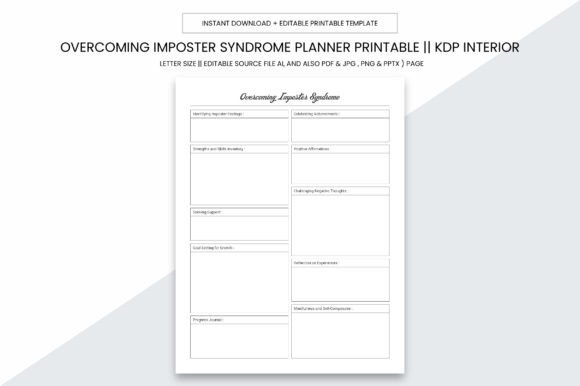
This isn’t a journal full of affirmations you skim and forget. It’s a 109-page, purpose-built interior designed to help you name, track, reframe, and gradually loosen the grip of self-doubt—on your terms, in real time. Whether you're launching your first KDP book, preparing a client pitch, teaching a new course, or simply trying to show up consistently on social media, this planner meets you where the friction lives.
When and Where This Planner Actually Gets Used
Think about the last time you delayed sending an email because it didn’t feel “perfect.” Or scrolled past your own post—not because it wasn’t good, but because you worried it wasn’t *enough*. That’s the exact window where the Overcoming Imposter Syndrome Planner becomes useful—not during calm reflection, but in the middle of the mess.
A freelance graphic designer uses the daily reflection pages before starting client revisions—writing down one specific fear (“They’ll think my concept is too basic”) and then flipping to the evidence tracker to list three past projects where clients praised her clarity and simplicity. A teacher preparing for parent-teacher conferences opens the “Strength Anchors” section to reread notes from students who said her feedback helped them improve. A blogger drafting a vulnerable personal essay pauses at the “Permission Slip” page—handwriting why this story matters *even if it doesn’t go viral*.
It’s practical size—8.5 x 11 inches—means it fits on a crowded desk, beside your laptop, or in a tote bag between co-working sessions. No bleed means clean, professional prints every time. And because it’s delivered as a digital download with editable source files (AI, PDF, JPG, PNG, PPTX), you’re not locked into one format. Need to tweak a heading for your coaching program? Adjust spacing for local print shop specs? Swap a prompt to match your team’s language? You can.
Real Use Cases Across Roles and Routines
For KDP authors: The planner includes dedicated sections for tracking launch nerves, comparing your early drafts to published bestsellers (not for comparison—but to notice patterns of growth), and reframing reviews—not as verdicts, but as data points. One indie author used the “Confidence Calibration Scale” weekly during her first 90 days of publishing. She rated how “qualified” she felt before and after each upload—and over time, saw her baseline confidence rise, even when external validation stayed steady.
For small business owners: When pricing services, many freeze—not because they don’t know their value, but because they haven’t practiced articulating it under pressure. The planner’s “Value Translation Worksheet” helps convert vague feelings (“I’m not sure what to charge”) into concrete anchors: hours invested, problems solved, outcomes delivered. A local web designer printed just that one page, laminated it, and kept it taped to her monitor during discovery calls.
For educators and course creators: Imposter syndrome spikes hardest when shifting from “learner” to “expert”—especially online. The “Authority Audit” spread walks you through documenting proof points: certifications earned, testimonials received, questions answered in communities, even informal mentoring you’ve done. It’s not about boasting—it’s about building a personal evidence file you can consult *before* recording a lesson or writing a syllabus.
For freelancers and solopreneurs: The “Comparison Detox Log” helps spot when social media scrolling triggers doubt—and redirects attention to your own metrics: repeat clients, project completion rate, time saved using a new workflow. One copywriter used it to realize she compared herself only to people posting reels—not to the quiet, consistent writers landing retainers month after month.
What to Consider Before You Download or Print
This planner works best when treated as a responsive tool—not a rigid system. If you tend to abandon planners after week two, start smaller: print just the “Daily Doubt Reframe” page and keep it clipped to your notebook. If you’re using it for team training, skip the personal journaling spreads and focus on the collaborative prompts—like “What’s one thing we’ve collectively underestimated about our work?”
Because it’s optimized for high-quality printing (300 ppi), it holds up whether you’re printing at home, at Staples, or prepping for KDP. But remember: the editable AI and PPTX files mean you can adapt it. A life coach added her branding colors and swapped the “Self-Doubt Triggers” list for her niche-specific examples (“When I see a client cancel last-minute…”). A university department head converted the reflection prompts into a shared Notion template for grad student mentors.
You don’t need to “fix” imposter syndrome to benefit from this planner. You just need to recognize when it’s showing up—and have something tangible to reach for instead of scrolling, over-editing, or shutting down. The 109-page PDF interior is structured to build momentum: early pages invite gentle awareness; middle sections support pattern recognition; later pages reinforce agency and forward motion—even on low-energy days.
Why Format and Flexibility Matter More Than You Think
Many planners fail not because their content is weak—but because their design fights real life. Tiny fonts. Overly decorative layouts that don’t survive black-and-white printing. Pages that look great on screen but crumble when photocopied for a workshop. The Overcoming Imposter Syndrome Planner avoids those pitfalls by design: clean typography, ample writing space, intentional white space, and zero bleed so nothing gets cut off at the edge.
The inclusion of multiple file types isn’t about convenience—it’s about control. Need to add your logo before sharing with clients? Use the AI file. Want to insert a custom cover slide for a presentation? Pull from the PPTX. Prefer handwriting on a tablet? The PDF is fully annotatable. Even the JPG and PNG versions let you drop single pages into Canva or social posts—say, sharing your “One Win Today” reflection as a quiet act of modeling self-compassion.
At its core, this planner supports what matters most: helping you stay connected to your capability—even when your brain insists otherwise. It won’t silence the inner critic overnight. But it gives you a place to name it, question it, and choose your next action anyway. That’s how confidence grows—not as a feeling, but as a series of small, documented choices.