Editable 2025 Monthly Planner Interior
Staying organized in 2025 doesn’t mean choosing between rigid paper planners or clunky digital apps — it means having full control over your planning system without needing design skills, paid software, or technical setup. The Editable 2025 Monthly Planner Interior is a thoughtfully built, all-in-one digital planner toolkit designed for real-life flexibility: professionals juggling deadlines, educators mapping out semesters, freelancers tracking client projects, and hobbyists managing personal goals — all with zero learning curve.
What makes this interior truly useful isn’t just its clean layout or holiday-ready 2025 calendar grid — it’s how easily you can personalize every page using only a free Canva account. No subscriptions. No downloads of unfamiliar editors. Just open the included Canva link, click to edit text, adjust colors, add logos, or rearrange sections — then export high-resolution files ready for printing or digital use.
Common Missteps That Undermine Your Planning Efforts
Many people assume “editable” means “plug-and-play,” only to discover later that their planner lacks essential structure or fails to scale across devices. Others download low-resolution files or templates missing key pages — like password trackers or contact lists — and end up stitching together mismatched tools. These oversights don’t just waste time; they erode consistency and reduce actual usage.
One frequent mistake? Assuming all “2025 monthly planner interiors” include the same content depth. Some versions skip critical organizational layers — like a yearly overview or dedicated note pages — forcing users to create workarounds. Another overlooked detail: file compatibility. Not all PDFs are print-ready. Some lack proper bleed settings, crop marks, or 300 DPI resolution — resulting in blurry prints or misaligned text when printed on standard 8.5×11 inch paper.
Also, many buyers miss checking whether editable elements actually function in Canva. A template labeled “editable” might only allow font changes — not layout adjustments, color swaps, or image replacements. That limits customization far more than expected.
Why File Quality and Structure Matter More Than You Think
Imagine preparing a client presentation and realizing your monthly planner’s header fonts render poorly on screen — or worse, your printed version shows faint gray lines because the file was saved at 72 DPI instead of 300 DPI. These aren’t small details; they affect professionalism, readability, and long-term usability.
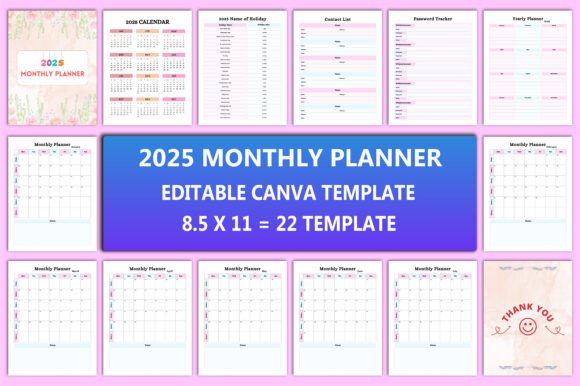
The Editable 2025 Monthly Planner Interior includes 22 distinct Canva template pages, each sized precisely to 8.5×11 inches with no bleed and optimized at 300 DPI. That means crisp text, smooth gradients, and reliable scaling — whether you’re printing at home, sending a JPEG to a local print shop, or viewing on a tablet. You’ll receive not just PDFs, but also JPG and PNG versions — giving you options for different platforms and uses without reformatting.
Beyond resolution, the interior’s architecture supports real workflow needs: a full-year snapshot, month-by-month spreads (January through December), two unique note pages for brainstorming or reflection, a password tracker that respects privacy, and even a “Belongs To” cover page — so your planner stays identifiable in shared spaces or co-working environments.
How to Use This Planner Without Wasting Time or Compromising Clarity
Start by opening the provided Canva link — no sign-up required if you already have a free account. From there, focus first on what *you* need most. Don’t try to customize everything at once. For example:
- If you're a blogger tracking content deadlines, prioritize editing the monthly planner pages — adding your editorial calendar column headers and adjusting date ranges.
- If you're an educator, use the yearly planner to block out school breaks and exam periods, then copy those dates into individual month spreads.
- Freelancers often benefit most from the contact list and password tracker — fill those in early, then save separate versions (e.g., “Client Contacts – Final” and “Passwords – Encrypted Copy”).
Avoid over-editing fonts or colors before testing print output. Try exporting one page as PDF first, then do a quick test print. Check alignment, margins, and contrast — especially if you plan to write directly on printed copies. Light-colored backgrounds may look elegant on screen but fade under marker pens.
What to Verify Before Downloading or Sharing
Before finalizing your purchase or sharing the planner with a team, confirm three things:
- Editable scope: Does the Canva link let you change text, colors, and layout blocks — not just type in pre-set fields?
- File completeness: Are all promised pages present — including the 2025 holiday list, contact sheet, and thank-you files? Cross-check against the product description.
- Export flexibility: Can you download each page individually as PDF, JPG, and PNG — or only as a bundled file? Individual exports give you room to mix and match pages across devices or workflows.
You’ll also want to ensure the holiday list reflects your region’s official observances — U.S., Canada, UK, Australia, and others often differ significantly in timing and naming. This version includes widely recognized 2025 holidays, but always double-check key dates relevant to your location or industry.
A Planner That Grows With Your Needs
This isn’t a static tool you outgrow after a few months. Because it’s built for Canva, you can duplicate pages, combine layouts, or build custom tabs — say, adding a “Social Media Content Calendar” page alongside your monthly spread. Need a simplified version for a teenager learning time management? Delete advanced sections and keep only the calendar grid and notes.
And since you get both digital and print-ready files, you’re never locked into one format. Use the PDF on your tablet with a stylus for daily check-ins. Print the yearly planner and hang it on your wall. Save the PNG of your password tracker as a secure desktop background (with sensitive info blurred, of course).
Thank you for visiting this product. If you appreciate thoughtful design, practical functionality, and true editability — without hidden fees or complexity — consider exploring other tools in the store. Each is crafted with the same attention to real-world use, file integrity, and ease of access.