Meal Prepping for Families Kdp Planner
Meal prepping for families isn’t just about saving time—it’s about consistency, intentionality, and reducing daily decision fatigue across multiple roles: parent, professional, creator, or small business owner. The Meal Prepping for Families Kdp Planner is designed not as a standalone checklist, but as an integrated workflow anchor—structured to support planning, execution, review, and iteration in real-world family life.
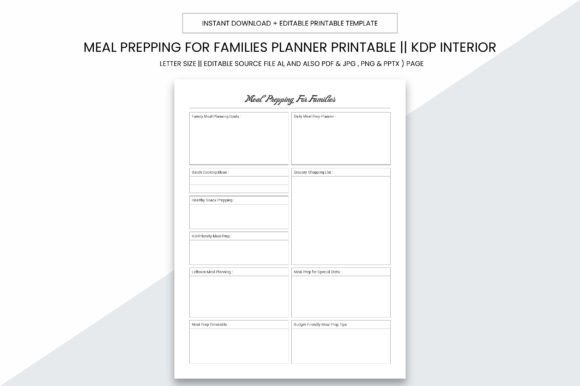
This 109-page interior is built for practicality first. Its 8.5 x 11 inch size fits standard home printers, office copiers, and local print shops—no bleed means clean margins and professional results every time. With high-resolution output at 300 PPI, it delivers crisp text, clear checkboxes, and well-spaced layouts whether printed on matte paper or glossy stock. That reliability matters when you’re printing batches for clients, bundling with digital courses, or stocking inventory for your KDP catalog.
How It Fits Into Your Existing Workflow
The planner doesn’t replace your calendar, grocery app, or recipe database—it complements them. Think of it as the central logbook where cross-platform inputs converge and outputs are tracked. For example:
- Before a weekly prep session: You pull recipes from Pinterest or a meal kit service, then transfer key details—ingredients needed, cook time, storage instructions—into the dedicated recipe tracker pages. This step surfaces gaps (e.g., “I need two more freezer-safe containers”) before shopping begins.
- During grocery planning: Use the built-in pantry audit section to cross-check what’s already on hand. The editable source files (AI, PDF, JPG, PNG, PPTX) let you add custom categories—like “school lunch items” or “allergy-safe staples”—so the tool adapts to your household’s actual constraints.
- After cooking: Log yield, taste notes, and reheat performance—not just “made it,” but “how well did it hold up on Day 4?” That data informs next week’s rotation and builds a living reference library over time.
This cyclical use—plan → execute → evaluate → refine—is where the planner adds measurable value. Unlike static templates, its structure supports iterative learning. A freelancer juggling client deadlines can batch-prep lunches on Sunday and use the “Time Spent vs. Servings Yielded” tracker to quantify ROI per hour invested. A homeschooling parent might pair it with a weekly rhythm chart, aligning meal themes (e.g., “Meatless Mondays”) with learning units or cultural studies.
Compatibility With Tools You Already Use
No new software required. The Meal Prepping for Families Kdp Planner works alongside tools most professionals rely on daily:
- Google Calendar or Outlook: Block prep windows directly into your schedule, then use the planner’s time-log pages to verify realistic estimates. Over time, you’ll adjust blocks based on actual prep duration—not idealized guesses.
- Shopping apps (e.g., Instacart, Walmart+, Amazon Fresh): Export your finalized shopping list (from the planner’s categorized checklist) into these platforms. The “Produce Shelf Life Guide” page helps prioritize perishables for same-day delivery vs. longer-storing pantry items for pickup later in the week.
- KDP publishing workflows: As a creator or small publisher, you can upload the ready-to-print PDF directly to Kindle Direct Publishing. The interior has been optimized for KDP’s formatting requirements—including correct margins, no bleed, and CMYK-safe color handling—so your paperback version arrives consistent and production-ready.
For educators or coaches offering family wellness programs, the editable AI file allows customization: insert your logo, adjust font hierarchy for brand alignment, or add localized substitution notes (e.g., “In Canada, swap ‘canned beans’ for ‘dried beans + pressure cooker times’”). That flexibility means one source file serves multiple audiences without redesign overhead.
Practical Implementation Tips
Start small. Don’t try to fill all 109 pages in Week One. Instead, identify one friction point—like inconsistent breakfasts leading to rushed school mornings—and use only the “Weekly Breakfast Planner” and “Freezer Inventory Tracker” pages for seven days. Observe what gets used, what gathers dust, and where assumptions break down.
Use color intentionally—but sparingly. If printing in grayscale, rely on bold headers and consistent icon placement instead of hue-based coding. The planner’s layout uses visual hierarchy (not color alone) to guide attention: ingredient lists sit above prep steps; storage notes appear beside each dish; serving sizes are called out before portioning grids.
For long-term use, treat the planner as a feedback loop—not a scorecard. Cross out unused sections. Add sticky notes with observations (“Kid ate lentil soup cold—skip reheating step next time”). When you reprint quarterly, those annotations become input for refining future versions, whether for personal use or commercial repackaging.
Quality Control and Consistency
The 300 PPI resolution ensures legibility even when printed on economy paper—critical if you’re producing bulk copies for workshops or gifting to clients. But resolution alone isn’t enough. The interior’s grid-based design maintains alignment across all page types: shopping lists line up with recipe cards; weekly calendars share the same column width as meal logs. That consistency reduces cognitive load—you don’t relearn layout logic each time you turn the page.
For KDP sellers, this uniformity translates to fewer customer complaints about misaligned text or clipped content. The no-bleed specification eliminates guesswork during trim setup. And because the PDF is layered and tagged correctly, screen readers interpret headings and lists accurately—supporting accessibility without extra development work.
Real Integration, Not Just Filling Pages
Integration isn’t about how many tools you connect—it’s about reducing redundant effort. When a blogger documents their “30-Minute Family Dinners” series, they can export the planner’s “Recipe Development Log” pages as part of their behind-the-scenes resource bundle. A nutritionist building a 6-week family reset program can embed the “Meal Prep Progress Dashboard” into their client onboarding packet—then review it during check-ins to discuss adherence patterns, not just outcomes.
Even solo creators benefit. If you record YouTube videos on kitchen efficiency, film prep sessions using the planner as your on-screen reference. Its clean typography and uncluttered spacing make it camera-friendly—no squinting or zooming required. Later, transcribe timestamps from your video into the planner’s “Time Audit” section to benchmark real-world speed against published claims.
Ultimately, the Meal Prepping for Families Kdp Planner works because it mirrors how people actually operate: iteratively, contextually, and with room for adjustment. It doesn’t assume perfection. It assumes you’ll shop at different stores, rotate caregivers, face ingredient shortages, or shift dietary needs mid-month—and gives you space to adapt without restarting from zero.
Whether you’re streamlining your own routine, supporting others through coaching or content, or scaling a KDP business around practical family tools, this planner meets you where you are: not at the start of some idealized system, but in the middle of real life—with everything you need to keep moving forward, clearly and consistently.