Learning a Second Language KDP Notebook
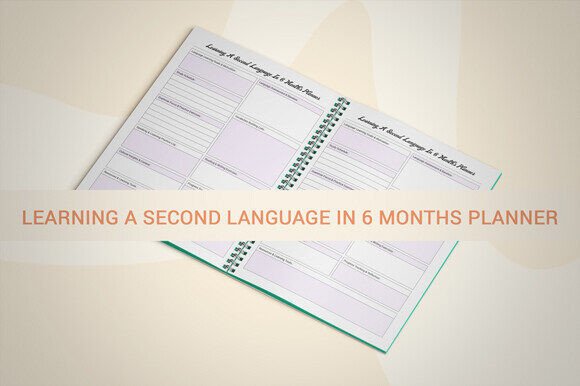
If you're building language-learning resources for Kindle Direct Publishing—or creating print-on-demand planners, journals, or educational tools—you need interiors that convert, print cleanly, and scale across audiences. The Learning a Second Language KDP Notebook isn’t just another printable—it’s a production-ready, professionally structured 109-page interior designed with creators in mind.
Why This Interior Stands Out for Real Creators
Most language notebooks on KDP are either overly generic or lack technical polish—bleed issues, inconsistent margins, low-resolution assets, or uneditable source files. This notebook solves those problems at the source. It ships with an editable Adobe Illustrator (.ai) file, plus layered PDF, JPG, PNG, and even PPTX versions—so whether you’re tweaking headers for branding, adjusting spacing for a specific audience, or repurposing pages into slide decks for teaching, you’re covered.
The 8.5 x 11 inch size is intentional: it’s large enough to support handwriting, vocabulary grids, verb conjugation tables, and audio-lesson notes—but compact enough to avoid high printing costs or awkward trim adjustments. And because it’s built with no bleed, your borders stay precise, your margins stay safe, and your KDP preview renders exactly as intended—no last-minute cropping surprises.
What You Get—and What That Means for Your Workflow
This isn’t a “print-and-pray” download. Every page is optimized for real-world use:
- 300 PPI resolution across all formats—ensures crisp text and clean lines whether printed locally or uploaded to KDP’s print engine;
- 109 fully laid-out PDF pages, pre-formatted to KDP’s interior requirements (including correct spine width calculations for paperback);
- No placeholder text or watermarks—just functional, minimalist design focused on clarity and usability;
- Editable vector layers in the .ai file, so you can change fonts, colors, icons, or layout blocks without pixelation or guesswork;
- Ready-to-upload structure—no reformatting needed before KDP submission, saving hours of troubleshooting.
That means if you run a small publishing business, teach Spanish online, or sell bilingual productivity kits on Etsy, you’re not starting from scratch. You’re launching faster—with higher perceived quality and fewer support requests from buyers wondering why their printed version looks blurry or misaligned.
Where This Notebook Fits in Real Projects
Professionals don’t buy notebooks—they buy solutions. Here’s how this interior delivers where it matters most:
Educators & Course Creators
Use the blank-lined and grid-based pages to scaffold lesson plans, track student progress, or build companion workbooks for your Udemy or Teachable courses. The editable AI file lets you insert your logo, course code, or weekly themes—turning a generic tool into branded course material.
Freelance Translators & Language Coaches
Log client sessions, note recurring grammar gaps, or map out custom learning paths. The consistent layout helps clients see structure and intention—building trust faster than a disorganized Google Doc ever could.
KDP Publishers Building Niche Series
This notebook is ideal as Book #2 or #3 in a “Learn [Language]” series—paired with a grammar guide (Book #1) and flashcards (Book #4). Its clean interior reinforces professionalism and positions your brand as detail-oriented and learner-focused—not just volume-driven.
Digital Product Sellers
Bundle the editable files with Canva templates or Notion dashboards. Offer the PDF as a standalone planner, the .ai file as a premium upgrade, and the PPTX version as a workshop handout. One interior, multiple revenue streams—no extra design time required.
Practical Considerations Before You Use It
Even great tools need smart implementation. Here’s what experienced creators keep in mind:
- Test print locally first—especially if adding spot color or using specialty paper. The 300 PPI ensures fidelity, but printer calibration varies;
- Check KDP’s latest interior specs—while this file meets current guidelines, always verify margin requirements and file naming conventions before upload;
- Customize strategically—don’t overhaul every page. A subtle header change or targeted icon swap often delivers more value than full redesigns;
- Pair with strong metadata—a technically perfect interior won’t rank without clear, benefit-driven titles, subtitles, and backend keywords like “Spanish study planner,” “KDP language journal,” or “printable French workbook.”
More Than Just Pages—It’s a Time-Saving Foundation
Time is the one resource you can’t scale. Every hour spent wrestling with bleed zones, re-exporting PDFs, or manually adjusting line spacing is an hour not spent writing, marketing, or engaging your audience. The Learning a Second Language KDP Notebook removes friction—not by oversimplifying, but by delivering precision where it counts.
It’s built for people who know that consistency builds credibility, that clean execution signals expertise, and that a well-structured interior doesn’t distract from the content—it elevates it. Whether you’re launching your first KDP title or scaling a portfolio of 20+ language tools, this notebook gives you a reliable, adaptable, and professional foundation.
And because it’s digital and editable, you’re not locked in. Repurpose pages for email lead magnets, adapt layouts for different age groups (e.g., simplified grids for teens, expanded reflection prompts for adults), or localize content for regional markets—all without commissioning new design work.
If your goal is to ship high-quality, usable, and commercially viable language-learning tools—without reinventing the wheel—this interior isn’t just helpful. It’s necessary infrastructure.