Learning to Code for Kids Planner: A Practical, Print-Ready Resource for Educators, Parents, and Creators
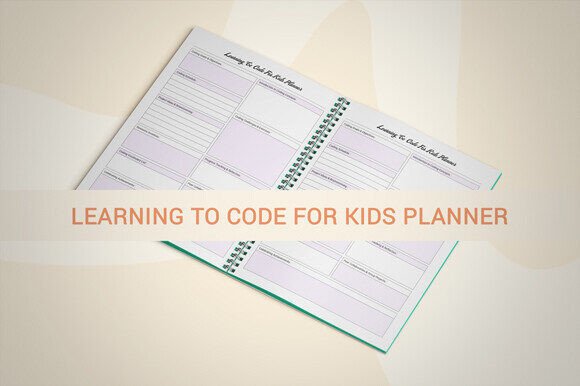
The Learning to Code for Kids Planner is a purpose-built digital planner designed to support structured, hands-on coding education for children aged 6–12. Unlike generic activity books or open-ended journals, it integrates pedagogical scaffolding—such as progressive skill trackers, visual debugging logs, project reflection prompts, and milestone checklists—into a cohesive 109-page interior. It’s not just a notebook; it’s a curriculum-aligned companion that bridges instruction and independent practice.
What Sets This Planner Apart
Three core attributes distinguish the Learning to Code for Kids Planner from alternatives:
- Digital-first flexibility with print-grade fidelity: Delivered as a digital download, it includes editable Adobe Illustrator (AI) source files alongside PDF, JPG, PNG, and PPTX versions—enabling customization before printing or adapting for classroom slides or digital learning platforms.
- KDP-optimized interior: The full 109-page PDF meets Amazon KDP’s technical requirements—including no bleed, 8.5 x 11 inch trim size, and 300 ppi resolution—making it ready for upload without layout adjustments or preflight troubleshooting.
- Functional design over decorative filler: Every page serves a documented learning objective: sequencing logs for block-based programming (e.g., Scratch), pseudocode templates, “bug hunt” worksheets, and growth-mindset reflection prompts—not generic lined pages or clipart-heavy layouts.
This combination of educational intent, production readiness, and file versatility makes the Learning to Code for Kids Planner especially relevant for users who need both teaching utility and commercial scalability.
How It Compares to Other Planning and Educational Resources
When evaluating resources for teaching coding to kids, users often consider three broad categories: printable workbooks, editable digital planners, and physical published workbooks. Each has tradeoffs in control, cost, adaptability, and distribution.
A standard printable workbook—say, one sourced from an educational blog or Teachers Pay Teachers—may offer age-appropriate activities but rarely includes editable source files or KDP-ready formatting. Users must manually adjust margins, test color profiles, or restructure pages to meet platform guidelines. That adds hours of prep time, especially for those unfamiliar with print production standards.
In contrast, a fully printed and bound workbook eliminates setup work but sacrifices customization. You can’t tailor vocabulary for different grade levels, add your school’s logo, or translate instructions into another language without reprinting entirely. For educators building custom curricula—or creators launching a KDP series—the lack of editable assets limits long-term utility.
The Learning to Code for Kids Planner sits between these options: it gives you the control of a digital toolkit with the polish of a professionally formatted interior. Because it includes AI files, you can modify fonts, adjust spacing for younger learners’ handwriting, or swap icons to match your preferred coding platform (e.g., replacing Blockly visuals with MakeCode equivalents). And because the PDF is built to KDP specs, you avoid common rejection triggers like incorrect bleed settings or low-resolution images.
Strengths and Realistic Limitations
Its greatest strength lies in consistency and readiness. If you’re preparing materials for a summer coding camp, developing a supplemental product line for your tutoring business, or launching a themed KDP series around computational thinking, the Learning to Code for Kids Planner reduces friction at multiple stages—from lesson planning to product fulfillment.
For example, a homeschool parent running a small co-op can use the editable AI files to add weekly goals and student names, then print single copies on-demand. A curriculum designer can integrate selected pages into a larger teacher guide using the PPTX version. A KDP publisher can upload the PDF as-is, test a proof copy, and scale to hundreds of units without redesigning the interior.
That said, it’s not a standalone curriculum. It doesn’t include lesson plans, video tutorials, or assessment rubrics—nor does it teach coding syntax directly. It assumes access to external tools (like Scratch, Tynker, or physical robotics kits) and benefits most when paired with guided instruction or structured online courses. It also doesn’t include editable text fields in the PDF version; full customization requires working in Illustrator or compatible vector software.
Additionally, while the 8.5 x 11 inch size supports clarity and writing space, it may be less portable than A5 or spiral-bound alternatives. Users prioritizing on-the-go use—say, for after-school clubs with limited storage—might prefer a smaller format, even if it means sacrificing some visual detail or multi-step layout options.
Best-Fit Scenarios and Decision Factors
The Learning to Code for Kids Planner is most effective when your goal involves repeatability, branding, or distribution—and when you value precision in both content and production.
Consider it if:
- You’re launching a KDP product and want to minimize interior formatting risk;
- You run a small educational business and need consistent, branded materials across students or seasons;
- You’re integrating coding into an existing program (e.g., STEM summer camps, library makerspaces) and require adaptable tracking tools;
- You’re comfortable with basic vector editing or have access to someone who is—and want to localize or extend the content beyond its original scope.
It’s less ideal if:
- You need plug-and-play digital interactivity (e.g., clickable buttons, embedded videos)—this is a static printable resource;
- You’re looking for a complete, turnkey teaching system with scripted lessons and answer keys;
- Your audience primarily uses tablets or Chromebooks and expects fillable PDF forms rather than handwritten input;
- You require accessibility features like screen-reader compatibility or adjustable font sizing across all formats—while the PDF is high-resolution, it’s not tagged for assistive technology by default.
Practical Use Beyond KDP
Though optimized for KDP, the Learning to Code for Kids Planner supports several other realistic applications. Local print shops can produce small batches for community centers or schools using the high-DPI PDF. Educators can extract individual pages—like the “My First Algorithm” flowchart template or “Debugging Detective” worksheet—for use in Google Classroom or LMS uploads (via JPG or PDF). Designers can repurpose vector elements from the AI file to build matching flashcards, posters, or slide decks.
Because it avoids licensed clipart or proprietary fonts, there are no hidden licensing constraints when adapting the material for non-commercial or small-scale commercial use—provided modifications respect the original license terms (typically for personal, educational, or resale use with attribution, depending on purchase tier).
Making an Informed Choice
Choosing the right tool for teaching coding to kids depends less on finding the “best” product and more on aligning format, function, and workflow. The Learning to Code for Kids Planner excels where control, consistency, and production readiness intersect. It won’t replace a live instructor or interactive platform—but it does provide a reliable, reusable structure for reinforcing concepts, documenting progress, and supporting metacognitive habits in young learners.
If your priority is speed-to-print, scalability, or the ability to refine and rebrand over time, this planner offers tangible advantages over static downloads or off-the-shelf notebooks. If your needs center on digital engagement, real-time feedback, or comprehensive curriculum scaffolding, pairing it with complementary tools—like a structured online course or a set of physical manipulatives—will likely yield stronger outcomes than relying on any single resource alone.