Editable New Home Essentials Checklist: A Practical Tool for Real-Life Transitions
Moving into a new home is rarely just about unpacking boxes. It’s a cascade of decisions, deadlines, and details—coordinating utilities, scheduling deep cleans, verifying appliance manuals, tracking warranty info, and aligning interior setup with daily routines. The Editable New Home Essentials Checklist addresses this complexity not as a static to-do list, but as a flexible, layered system designed for active use—not passive storage.
What It Is—and What It Does Differently
This isn’t a generic PDF with bullet points you’ll print once and lose in a folder. The Editable New Home Essentials Checklist is a curated Canva-based toolkit built around real-world moving phases: pre-closing prep, move-in day coordination, first-week settling, and long-term home maintenance. Its value lies in structure *and* adaptability—each page serves a distinct functional purpose while sharing consistent formatting, spacing, and visual hierarchy.
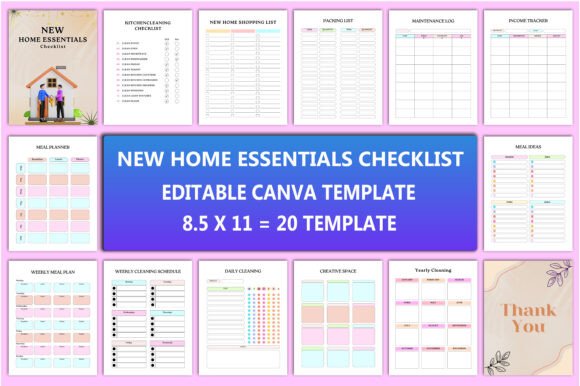
For example, the Interior version goes beyond surface-level room-by-room prompts. It includes dedicated sections for lighting placement notes, outlet labeling reminders, HVAC filter replacement dates, and even wall-mounting hardware inventory—details that often get overlooked until something breaks or needs repositioning. Unlike templated lists found on blogs or Pinterest, this set anticipates follow-up actions: “Did you test all GFCI outlets?” links logically to the Maintenance Log, which then connects to the Yearly Cleaning schedule for seasonal HVAC servicing.
Quality and Usability in Practice
The files deliver what they promise: high-resolution, print-ready assets at 8.5×11 inches, 300 DPI, no bleed—ideal for both digital planning and physical reference. JPEG, PNG, and PDF versions are included, each optimized for its intended use: PDFs for archiving and printing, PNGs for quick digital annotation, JPEGs for lightweight sharing. All maintain crisp text and clean vector-style icons—even when zoomed or scaled.
Editing via Canva is genuinely frictionless. No design experience is required. Text fields are clearly labeled and spaced; color palettes are muted and accessible (no neon gradients or low-contrast type); checkboxes and toggle-style elements behave predictably across devices. You can rename “Kitchen Cleaning Checklist” to “Post-Renovation Deep Clean,” adjust due dates in the Packing List, or add a custom column to the Income Tracker—all without breaking layout integrity.
That consistency matters. When users juggle multiple documents—say, cross-referencing the New Home Shopping List against the Weekly Meal Plan during grocery prep—the shared grid system and uniform font weights reduce cognitive load. There’s no guessing whether “Week 3” in the meal planner aligns chronologically with “Month 1” in the maintenance log. Time-based sections sync cleanly because they were built with temporal logic in mind—not just visual symmetry.
Who Benefits—and Where It Fits Workflow
Professionals relocating for work—especially those managing remote teams or client-facing schedules—gain measurable time savings. A freelance graphic designer moving studios can use the Creative Space template to map power sources, monitor height adjustments, and track software license transfers alongside physical gear. An educator setting up a home classroom might layer the Daily Cleaning schedule over the To Do List, assigning light tasks to students while reserving deeper maintenance for weekends.
Small business owners handling their own office moves find particular utility in the Shopping List and Packing List combo. These aren’t isolated sheets—they’re interoperable. Items flagged “urgent” on the shopping list auto-suggest priority packing categories (e.g., “Wi-Fi router + cables” appears under both “Tech Setup” and “First-Night Box”). That kind of embedded logic reflects lived experience—not theoretical organization.
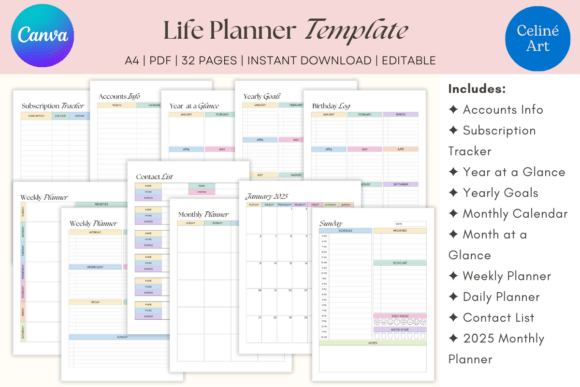
Freelancers and content creators also benefit from the Notes and Thank You Files pages. These aren’t afterthoughts; they’re structured for reuse. The Notes page includes date stamps and section headers (“Vendor Follow-Ups,” “Inspection Findings,” “Contractor Agreements”)—making it viable for documenting contractor interactions during renovations. The Thank You Files support post-move relationship management: sending personalized notes to movers, neighbors, or inspectors without drafting from scratch.
Realistic Considerations and Limitations
No checklist eliminates unpredictability—leaky faucets still appear, contractors still reschedule, and Wi-Fi signals still vanish behind drywall. This tool doesn’t claim to prevent those moments. Instead, it reduces the secondary stress: forgetting to update your address with the DMV, misplacing appliance warranties, or realizing mid-week you haven’t scheduled gutter cleaning since spring.
Its main limitation is scope-bound: it assumes a standard residential context. Users managing multi-unit rentals, historic properties with nonstandard systems, or international relocations may need to supplement certain sections (e.g., adding local permit requirements to the Maintenance Log). Similarly, while the Meal Planner supports dietary tags and portion notes, it doesn’t auto-generate recipes—it’s a framework, not an AI assistant.
Also worth noting: the Canva link grants editing access, but requires a free Canva account. That’s a minor barrier for some—but it’s balanced by the fact that Canva’s interface is more intuitive than desktop publishing tools, and the templates avoid nested layers or locked elements that frustrate beginners.
Long-Term Value Beyond Move-In Day
Most new-home checklists fade after month one. This one evolves. The Yearly Planner integrates with the Yearly Cleaning and Maintenance Log to create a living record—not just of tasks completed, but of patterns observed. Did the furnace require service every November? Does the kitchen grout stain faster near the sink? Tracking those insights across years turns reactive upkeep into proactive stewardship.
Even the Weekly Cleaning Schedule scales meaningfully. Its default structure allows for role delegation (e.g., “Dust baseboards – Partner / Vacuum high-traffic areas – Teen”), making it viable for growing households or shared living situations. And because all files share the same dimensions and grid, printing a fresh set each quarter—or exporting updated versions for shared drives—is seamless.
If you’ve ever paused mid-unpacking to Google “how often to replace water softener salt” or scrolled through 17 browser tabs trying to compare smart thermostat models, the Editable New Home Essentials Checklist offers grounded utility—not hype. It won’t pack your boxes or negotiate your lease, but it does provide clear, editable scaffolding for everything else. For professionals, creatives, and families who treat organization as infrastructure—not decoration—it’s less of a download and more of a quietly reliable foundation.