Editable 75 Soft Challenge Interior
The Editable 75 Soft Challenge Interior is more than a printable planner—it’s a thoughtfully structured, fully customizable productivity toolkit designed for people who value intentionality without sacrificing flexibility. Unlike rigid systems that demand strict adherence, this interior framework supports gradual, sustainable habit-building through soft accountability: gentle reminders, reflective prompts, and adaptable layouts that meet users where they are—whether launching a side project, managing burnout, balancing caregiving with career goals, or simply reclaiming daily clarity.
Why “Soft” Is Becoming the Standard in Personal Systems
Over the past three years, digital wellness research and behavioral psychology studies have consistently shown that overly prescriptive tools lead to higher dropout rates—especially among adults juggling multiple roles. The “soft challenge” model responds directly to that reality. It replaces all-or-nothing tracking with compassionate scaffolding: space to note progress *and* pause, options to adjust goals weekly, and visual cues that encourage reflection rather than judgment. This isn’t about lowering standards—it’s about aligning structure with how real human attention, energy, and motivation actually behave.
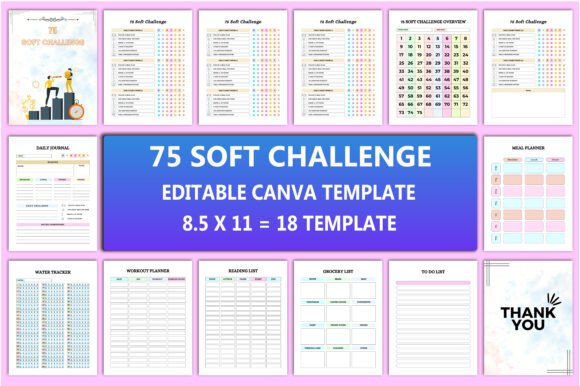
Professionals, educators, freelancers, and small business owners increasingly seek tools that integrate seamlessly into existing workflows—not ones that require hours of setup or force unnatural routines. The Editable 75 Soft Challenge Interior meets that need by offering 18 distinct Canva templates (all sized at 8.5×11 inches, 300 DPI, no bleed), each purpose-built for a specific function yet unified by consistent typography, spacing, and visual hierarchy. That cohesion reduces cognitive load while preserving room for personalization—no design skills required.
What You Actually Get—and Why Each Component Matters
This isn’t a bundle of generic pages slapped together. Every included interior page serves a documented behavioral function:
- 75 Soft Challenge Overview – A one-page anchor that frames the full 75-day journey with milestones, theme prompts, and space to define what “soft” means personally (e.g., “I’ll rest without guilt,” “I’ll say no to one non-essential request per week”).
- Daily Journal – Goes beyond mood tracking: includes micro-reflection prompts (“What felt aligned today?”), energy-level notation, and optional gratitude logging—all designed to surface patterns over time, not just record surface activity.
- Meal Planner & Grocery List – Built with realistic constraints in mind: sections for pantry staples, flexible meal categories (not recipes), and visual icons for dietary preferences (vegetarian, gluten-free, quick-prep). Syncs naturally—plan a dinner, auto-populate ingredients on the grocery list.
- Water Tracker & Workout Planner – Avoids gamified pressure. Water uses gentle hourly check-ins (not rigid cup counts); workouts include “intention” fields (“Today’s goal: mobility, not intensity”) and recovery notes.
- Reading List & To Do List – Prioritizes curation over accumulation. The reading list has fields for source, format (audiobook, physical, article), and “why now?” The To Do List separates “committed,” “considering,” and “parking lot” items—reducing decision fatigue.
- Notes Page – Clean, unlined, and spacious—ideal for brainstorming, meeting takeaways, or capturing ideas mid-flow without formatting distractions.
All pages are delivered as editable Canva links—free account compatible—so users can change fonts, colors, headers, or layout order in minutes. No software downloads, no learning curve. And because life happens across devices and platforms, you also receive high-resolution PDF, JPEG, and PNG files—ready for printing, sharing via email, embedding in Notion, or uploading directly to client-facing portals.
How Modern Workflows Are Shaping Tool Design
Remote work, asynchronous collaboration, and hybrid schedules have reshaped how people plan. Static planners fail when deadlines shift, meetings reschedule, or priorities pivot mid-week. The Editable 75 Soft Challenge Interior anticipates that fluidity. Its Canva-native format allows users to duplicate pages, reorder sections, or create variants (e.g., a “client project” version of the To Do List or a “family weekend” version of the Meal Planner) without rebuilding from scratch.
For creators and marketers, this adaptability extends to branding: swap in your logo, adjust accent colors to match your palette, or add custom headers before sharing with an audience. Educators use the Reading List and Notes pages to scaffold student reflection; entrepreneurs repurpose the Daily Journal as a weekly team sync template. The interior doesn’t assume your role—it supports it.
Realistic Customization—No Design Degree Required
Many editable planners promise flexibility but deliver cluttered interfaces or vague instructions. This interior avoids that trap. Each Canva template uses locked background elements (grids, dividers, subtle textures) and unlocked text boxes—so editing stays intuitive. Want to rename “Workout Planner” to “Movement Tracker”? Click, type, done. Prefer bullet points over checkboxes on the Grocery List? Swap them in seconds. Need larger font for accessibility? Adjust globally in Canva’s style panel.
And because all files are delivered at print-ready 300 DPI, edits don’t compromise quality. Whether you’re ordering professional prints, sharing a branded PDF with clients, or saving a PNG for Instagram Stories—the output remains crisp and intentional.
Beyond Tracking: Building Capacity, Not Just Checklists
At its core, the Editable 75 Soft Challenge Interior supports capacity-building—not just task completion. The inclusion of a dedicated Notes page, paired with open-ended prompts in the Daily Journal and Overview, creates space for metacognition: noticing *how* you work, not just *what* you do. That awareness becomes actionable insight—e.g., realizing energy dips every Tuesday afternoon leads to smarter scheduling; spotting repeated “parking lot” items reveals misaligned commitments.
It also acknowledges that sustainability isn’t about consistency alone—it’s about resilience. When life interrupts (and it will), the system doesn’t collapse. You skip a day, revisit the Overview, adjust your next milestone, and continue. There’s no penalty screen, no reset button—just quiet support.
Who Benefits Most—and How They Use It
Freelancers use the Meal Planner + Grocery List combo to batch-shop during low-energy windows, freeing mental space for client work. Bloggers embed the Reading List into their content research workflow, tagging entries by topic and linking to drafts. Small business owners combine the To Do List with the Notes page to track vendor follow-ups alongside strategic reflections. Educators adapt the Daily Journal for student self-assessment prompts. Even hobbyists—writers, gardeners, musicians—use the Water Tracker and Workout Planner not for fitness metrics, but as gentle anchors for showing up consistently, even in small ways.
None of these uses require changing the underlying structure. They emerge naturally from the interior’s balance of guidance and openness—a balance that’s rare in off-the-shelf tools.
Final Thought: Tools Should Serve Your Rhythm, Not Dictate It
The Editable 75 Soft Challenge Interior reflects a broader shift: away from productivity-as-punishment and toward productivity-as-practice. It doesn’t ask you to become someone else. It gives you clean, capable, beautiful scaffolding to become more clearly, compassionately, and effectively yourself—over 75 days, and beyond. You’ll get high-quality files ready for immediate use, full editability through a free Canva account, and a system built not for perfection, but for presence.
Thank you for visiting my product. If you like this product then, don’t forget to visit my store.