Order Form KDP Interior Template: A Practical Evaluation for Self-Publishers
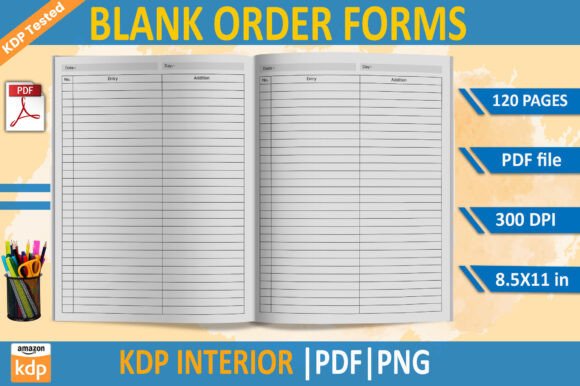
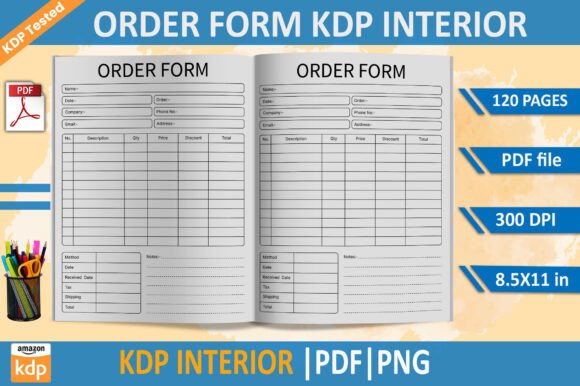
The Order Form KDP Interior Template is a pre-designed, print-ready interior file intended for use with Amazon Kindle Direct Publishing (KDP). It consists of 120 pages in two formats: a high-resolution PDF and a transparent-background PNG set, both sized at 8.5 × 11 inches and optimized to KDP’s technical requirements—including 300 DPI resolution and no bleed. The template is labeled “100 tested,” indicating it has been validated against KDP’s upload and printing systems.
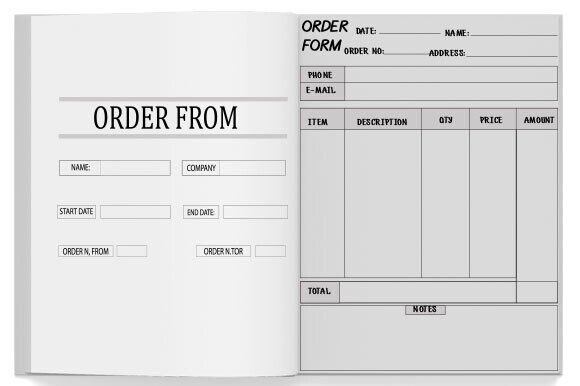
This template is not a blank layout or a generic design tool. Rather, it is a functional interior file structured specifically for order forms—commonly used in workbooks, planners, business resources, or service-based guides where readers need space to record contact details, product selections, quantities, pricing, or delivery instructions. Its fixed page count and formatting reflect a standardized, ready-to-deploy solution rather than a customizable framework.
Who Might Consider This Template—and Why
Self-publishers evaluating the Order Form KDP Interior Template typically fall into one of several categories:
- Service providers or consultants who create printed client resources—such as intake packets, proposal worksheets, or fulfillment checklists—and want a consistent, professional interior without investing time in layout software.
- Authors of niche nonfiction, particularly in fields like real estate, contracting, event planning, or small-business administration, where standardized order documentation supports usability and credibility.
- New KDP users seeking a low-risk entry point into print-on-demand publishing, especially those unfamiliar with KDP’s margin, bleed, and resolution requirements.
In each case, the appeal lies in immediacy and compatibility: the template eliminates the need to troubleshoot formatting errors during KDP upload, reduces time spent on design iteration, and provides a known baseline for how content will appear in the final printed book.
Practical Benefits and Realistic Tradeoffs
The primary benefit of the Order Form KDP Interior Template is reliability. Because it is explicitly “KDP tested,” users can reasonably expect successful upload, preview rendering, and print output—assuming content is added within the provided structure and no major modifications are introduced. The inclusion of both PDF and PNG files offers flexibility: the PDF serves as the production file for printing, while the transparent-background PNGs allow for layering or digital reuse in presentations or marketing materials.
However, this reliability comes with constraints. The fixed 120-page length means the template is not scalable—adding or removing pages requires manual adjustment or external design work. There is no built-in customization for fonts, spacing, or field labels; users must edit text directly in compatible software (e.g., Adobe Acrobat for PDF, or graphic editors for PNG), which may introduce alignment or resolution issues if not handled carefully. Additionally, the absence of bleed is appropriate for certain use cases but limits full-bleed design options, such as background colors or images extending to the edge of the page.
Another consideration is long-term adaptability. Because the template is delivered as static files—not editable source files (e.g., InDesign or Word)—making structural changes (like reordering sections, adjusting grid layouts, or modifying form logic) is not feasible without redesigning from scratch. Users should assess whether their current and anticipated future needs align with a fixed interior format.
When This Template Is a Strong Fit
The Order Form KDP Interior Template works well when the following conditions apply:
- You need a simple, single-purpose interior for a printed order or intake document—not a multifaceted workbook with varied content types (e.g., charts, illustrations, narrative text).
- Your workflow prioritizes speed over fine-grained control: you’re comfortable inserting text into predefined fields and do not require dynamic elements like fillable PDF forms or interactive components.
- You’re publishing a short-run or test version of a resource and want to validate market interest before committing to custom design.
- You lack access to—or familiarity with—desktop publishing tools and prefer a plug-and-play solution that meets KDP’s minimum technical thresholds.
In these scenarios, the template functions as a pragmatic starting point: it delivers consistency, avoids common upload failures, and minimizes upfront investment in time or software.
When Alternatives May Be More Appropriate
Conversely, consider other options if any of the following apply:
- You require full typographic or structural control. If your project demands custom margins, multi-column layouts, embedded tables, or branded typography, a blank KDP-compliant template (or hiring a designer) will offer greater flexibility.
- You plan to repurpose the interior across multiple formats. For example, if you intend to release both print and eBook versions, a reflowable EPUB or Word-based workflow may be more maintainable than editing static PDF/PNG files.
- Your audience expects interactivity. While this template supports handwritten or typed entries, it does not generate fillable PDF fields or integrate with digital submission systems. In those cases, dedicated form-building tools or custom development may be necessary.
- You anticipate frequent updates. Maintaining 120 static PNGs or a large PDF across revisions increases overhead. A modular, source-based design system simplifies version control and collaboration.
Making an Informed Decision
Evaluating the Order Form KDP Interior Template ultimately depends on matching its capabilities to your specific publishing goals—not just your immediate task. Ask yourself:
- What is the core function of this printed piece? Is it primarily a reference tool, a transactional document, or a learning aid?
- How much time and technical comfort do I have for layout adjustments versus content creation?
- Will this interior remain unchanged across editions—or does my use case demand iterative improvements?
- Do I need to meet additional distribution requirements beyond KDP (e.g., IngramSpark, local printers), which may have different file specifications?
If the answers point toward simplicity, standardization, and rapid deployment, the template is a reasonable choice. If they point toward scalability, brand integration, or evolving functionality, investing in adaptable tools or professional support may yield better long-term outcomes.
Finally, remember that KDP’s guidelines evolve. Even a “100 tested” file should be verified against current KDP requirements before final upload—particularly regarding safety margins, color mode (CMYK vs. RGB), and file naming conventions. Checking the latest KDP help documentation remains essential, regardless of template claims.