Blank Order Forms KDP Interior Template
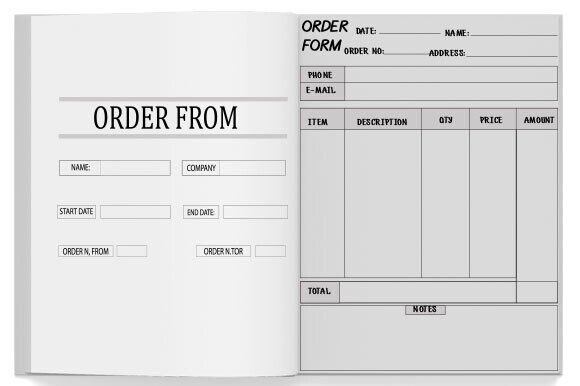
If you're preparing a printable order form book for Amazon KDP—and want it to print cleanly, upload smoothly, and look professional—this Blank Order Forms KDP Interior Template is built exactly for that. It’s not a generic layout or a DIY sketch. It’s a fully tested, production-ready interior file designed to meet Kindle Direct Publishing’s strict formatting requirements—so you spend less time troubleshooting and more time serving your customers.
What You’re Actually Getting (No Guesswork)
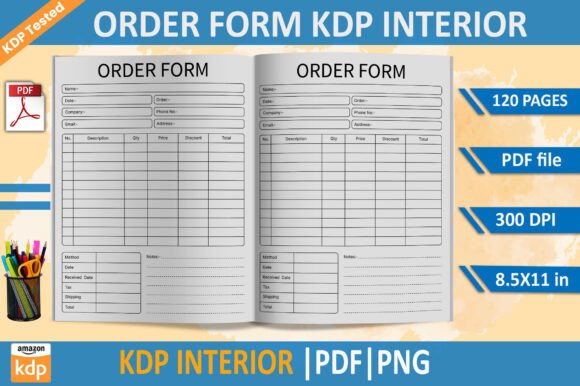
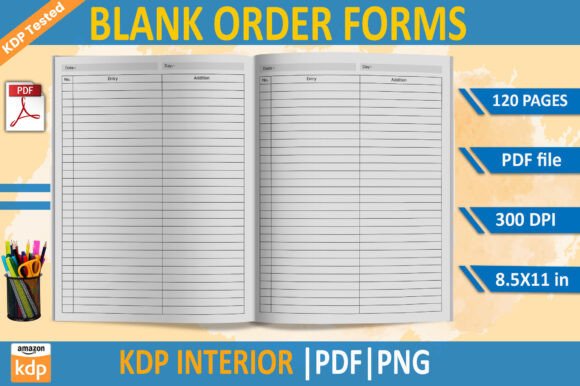
This isn’t just a single PDF you open and hope works. You receive a complete, cohesive set of files—all sized to 8.5 × 11 inches, at 300 DPI for crisp printing, with no bleed (which aligns perfectly with KDP’s standard non-bleed interior specs). The core is a ready-to-upload 120-page Print PDF—already formatted, numbered, and spaced for consistent margins and readability. But the real flexibility comes from the editable and versatile extras:
- EPS file: Ideal if you use Adobe Illustrator or similar tools and need full vector control—change fonts, adjust spacing, or add your logo without quality loss.
- Transparent-background PNG: Perfect for overlaying forms onto branded stationery, digital dashboards, or custom packaging mockups.
- High-resolution JPG: Great for quick previews, client samples, or embedding in presentations or training materials.
All files are pre-validated: “KDP tested” means someone has already uploaded, previewed, and printed this exact setup on Amazon—and confirmed it passes every checkpoint, from page count to gutter alignment.
Who Benefits—and Why It Fits Real Workflows
You don’t need to run a large business to get value from these pages. In fact, many users start small—and grow into consistent systems. A freelance graphic designer might use one page per client to track project scope, deadlines, and deliverables. A local bakery owner could print 20 copies, keep them near the counter, and handwrite daily wholesale orders from cafes. An educator building a homeschool co-op might adapt the forms to collect supply fees, field trip permissions, or material requests—then reuse the same clean structure year after year.
Small service providers—like house cleaners, pet sitters, or personal trainers—often find these forms especially helpful because they eliminate messy notes or fragmented texts. Instead of juggling voice memos and sticky notes, they log appointments, preferences, and follow-ups in a uniform way. That consistency builds trust, reduces errors, and saves mental energy.
Even creators publishing companion workbooks or planners on KDP use this template as a foundation. Since it’s blank and unbranded, it integrates seamlessly into larger product suites—say, a meal-planning journal that includes a weekly grocery order sheet, or a home renovation checklist bundle with dedicated vendor contact and ordering pages.
How It Works in Practice (Without Tech Headaches)
Upload is straightforward: take the included Print PDF, go to your KDP dashboard, create a new paperback, and select that file as your interior. No conversion needed. No warnings about margins or resolution. Because it’s built to KDP’s current guidelines (as of 2024), you avoid common rejection reasons like text cutoff, blurry lines, or incorrect page size.
Editing is equally low-friction. Open the EPS in Illustrator to change line thickness, add checkboxes, or insert your business name in the header. Use the PNG to drop a clean form into Canva for social media demos—or layer it over a photo of your shop counter for an Instagram story. The JPG? Print it directly for a physical sample before ordering bulk copies.
And because it’s 120 pages, you have room to customize depth without rushing. Maybe you use only 30 pages now—but leave space for seasonal updates, new service tiers, or multi-step workflows later. No need to repurchase or redesign.
Things to Keep in Mind Before You Start
While this Blank Order Forms KDP Interior Template handles the heavy lifting of formatting, a few thoughtful choices will help you get even more out of it:
- Think ahead about handwriting vs. typing: The layout assumes standard pen or pencil use. If you plan to fill forms digitally (e.g., with a tablet stylus), test one page first—some PDF readers handle form fields differently than static layouts.
- Branding is up to you: This is intentionally blank—not minimalist design, but functional neutrality. That gives you freedom, but also responsibility. Add your logo, colors, or contact info where it makes sense—just ensure contrast stays high for readability.
- Double-check your printer settings: Even with no bleed and correct DPI, home printers sometimes auto-scale or add borders. For best results, choose “Actual Size” or “Disable Scaling” in your print dialog—especially when making test copies.
- KDP updates happen: While this version is verified against current specs, Amazon occasionally adjusts requirements (e.g., minimum margin thresholds). Keep an eye on their official guidelines—but know that this template was built with longevity in mind, using conservative margins and widely supported fonts.
A Practical Tool, Not a Gimmick
At its core, this Blank Order Forms KDP Interior Template answers a quiet but persistent need: how do I turn scattered requests into organized, repeatable action? It doesn’t promise to automate your business—but it does remove friction from documentation, improve clarity across teams or clients, and give your operations a grounded, professional feel—even when you’re working solo.
Whether you're testing a side hustle, streamlining a family-run shop, supporting students with structured assignments, or launching your first KDP planner, having a reliable, printable, and adaptable order form system makes a tangible difference. It’s the kind of resource that quietly pays off every time you avoid a miscommunication, save five minutes on admin, or hand a polished sheet to someone who thinks, “Oh—this is easy to use.”
No learning curve. No licensing limits. Just clean, usable pages—ready the moment you download.