Baby Sleep Training Notes Kdp Interior
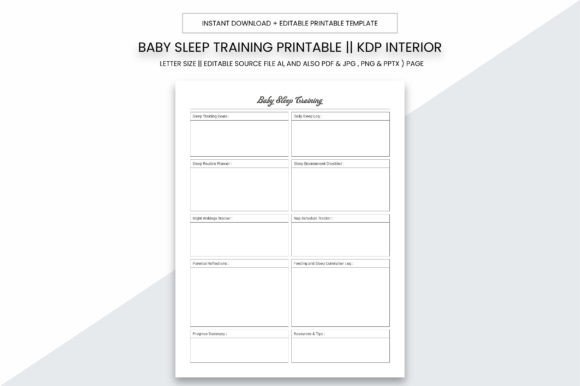
The Baby Sleep Training Notes Kdp Interior is a purpose-built, print-ready interior file designed for creators and small business owners preparing sleep training journals or logbooks for Amazon KDP. It’s not just a template—it’s a production-ready asset engineered to streamline publishing workflows while supporting real-world use cases: tracking infant sleep patterns, documenting caregiver observations, aligning with pediatric recommendations, and maintaining consistency across printed products.
At its core, this interior functions as a structural foundation—not a standalone solution, but a critical component in a larger content creation pipeline. Whether you're launching your first KDP journal or scaling a catalog of parenting resources, the Baby Sleep Training Notes Kdp Interior integrates into your process at key inflection points: during pre-launch preparation, mid-production refinement, and post-upload quality assurance.
How It Fits Into Your Publishing Workflow
Before uploading to KDP, interior files must meet strict technical requirements: correct dimensions, bleed-free margins, 300 PPI resolution, and CMYK color mode for accurate printing. This interior is built to those specifications—8.5 x 11 inches, no bleed, 300 ppi DPI—so it skips common formatting delays. You avoid resizing, re-exporting, or troubleshooting printer mismatches later. That means faster time-to-market and fewer rejected uploads.
During production, the editable source file (Adobe Illustrator .ai) lets you customize typography, adjust spacing for readability, insert branded headers, or modify section labels without compromising layout integrity. Unlike rigid PDF-only templates, this gives you control over visual hierarchy—critical when designing for caregivers who need quick scanning and reliable data entry.
After upload, the 109-page PDF version serves dual roles: it’s both your final KDP submission file *and* a reference for internal consistency checks. You can cross-verify page count, header alignment, grid spacing, and font rendering before hitting “publish.” That level of fidelity reduces revision cycles and supports long-term catalog maintenance.
Compatibility With Real Tools and Teams
This interior works natively with industry-standard tools. The .ai file opens directly in Adobe Illustrator CC (2020+), allowing seamless integration with brand libraries, color palettes, and style guides already in use by designers or marketing teams. If your workflow includes Canva or Affinity Designer, you can export high-res PDFs or PNGs from Illustrator first—then import them as static assets where vector editing isn’t needed.
For non-designers—freelancers managing multiple clients, educators co-developing resources, or solo publishers handling everything—the included PDF, JPG, PNG, and PPTX versions offer flexibility. Use the PPTX file to pitch layout concepts to editors or reviewers; drop the JPG into mockup generators for Amazon storefront visuals; embed the PNG in email sequences explaining product features to customers.
It also interfaces cleanly with project management systems. You might tag tasks in Notion or ClickUp like “Update Section 4 – Night Wakings Log” and attach the Illustrator file directly. Or link the PDF to a shared Google Drive folder labeled “KDP Interiors – Finalized,” ensuring version control across collaborators without confusion over which file is approved.
Practical Implementation Tips
Start with structure, not decoration. Open the .ai file and review the master pages first. Notice how headers, footers, and grid lines are locked to prevent accidental shifts. Make global changes—like adjusting line height for better handwriting space—before editing individual pages. This preserves consistency across all 109 pages.
Use the PDF for rapid validation. Print one copy on standard 8.5 x 11 paper using your home or office printer. Check margin clearance, font legibility at actual size, and spacing between rows in log tables. A physical proof catches issues digital previews miss—especially how much room caregivers actually need for notes.
Leverage the multi-format bundle intentionally. Don’t treat JPG and PNG as duplicates. Use the JPG for fast social media teasers (Instagram carousels showing sample pages); use the PNG with transparent background for overlaying on lifestyle photos in ads; use the PPTX to build quick training decks for virtual workshops or client onboarding.
Plan for scalability. If you intend to launch related titles—like a feeding tracker or developmental milestone journal—use the same base grid and header style from this interior. Consistency across your KDP catalog builds recognition and lowers customer support load (“I know how to use this because it matches your sleep journal”).
Organization and Long-Term Usability
The interior includes logical section breaks: daily logs, weekly summaries, pattern analysis prompts, caregiver reflections, and pediatrician note fields. These aren’t arbitrary—they mirror evidence-based sleep training frameworks used by certified consultants and early childhood specialists. That alignment makes the notebook credible to informed buyers and easier to position in search results for terms like “evidence-based baby sleep journal” or “pediatrician-approved sleep log.”
Because it’s fully editable, you can adapt sections for niche audiences without rebuilding from scratch. Add bilingual labels for Spanish-speaking parents. Insert checkboxes aligned with the Ferber method or gentle sleep coaching principles. Tweak column widths to accommodate longer observational notes if your audience prefers narrative over tick-box entries.
For long-term use, store the .ai file in a dedicated cloud folder with clear naming: Baby_Sleep_Notes_Interior_v2_2024.ai. Archive older versions separately. This prevents accidental overwrites and supports iterative improvement—say, adding QR codes linking to video tutorials in future editions.
Quality Control and Print Readiness
Every page is built at true 300 PPI resolution in CMYK mode—no upscaling, no RGB-to-CMYK conversion surprises. That means what you see in Illustrator is what prints on KDP’s press. No color shifts, no blurry text, no unexpected cropping. You’re not guessing whether “light gray grid lines” will disappear on matte paper; you’re verifying it against real output specs.
Test print a few key spreads: the cover page (if included), the first daily log, and a summary chart. Hold them under the same lighting conditions your end users will encounter—bedside lamps, nursery daylight, or low-light nursing chairs. Does the contrast hold? Is ink bleed an issue with certain pens? Adjust stroke weights or background opacity in Illustrator *before* final export if needed.
Also verify KDP’s current file requirements before uploading. While this interior meets baseline standards, Amazon occasionally updates supported file types or metadata rules. Cross-check their latest guidelines, then run your final PDF through KDP’s online previewer—not just once, but after each major edit.
Real Integration Examples
- A freelance designer uses the .ai file to white-label the interior for three different parenting coaches—changing only logos, colors, and introductory text. Each gets a unique ISBN, but shares the same underlying structure and usability testing.
- An educator building a continuing education course for childcare providers exports the PPTX to create slide decks demonstrating how to interpret sleep logs in practice—then links the PDF download as a student resource.
- A blogger with a monetized newsletter bundles the printable PDF with a paid sleep strategy guide. Subscribers get immediate access via download link—and the blogger retains full rights to repurpose the AI file for future products.
The Baby Sleep Training Notes Kdp Interior doesn’t replace strategy or subject-matter expertise. It replaces friction. It turns technical setup into a repeatable step—not a bottleneck. When your focus stays on delivering value—whether that’s clarity for overwhelmed parents, credibility for health professionals, or consistency for your brand—the right interior file becomes infrastructure, not overhead.