Password Log Book KDP Template
A well-structured, print-ready Password Log Book KDP Template serves a quiet but essential role in the Amazon KDP ecosystem: it bridges the gap between functional utility and professional publishing standards. Unlike generic notebooks or hastily assembled interiors, this template is built with specific technical and operational requirements in mind—making it a practical choice for creators who prioritize reliability over novelty.
What This Template Actually Delivers
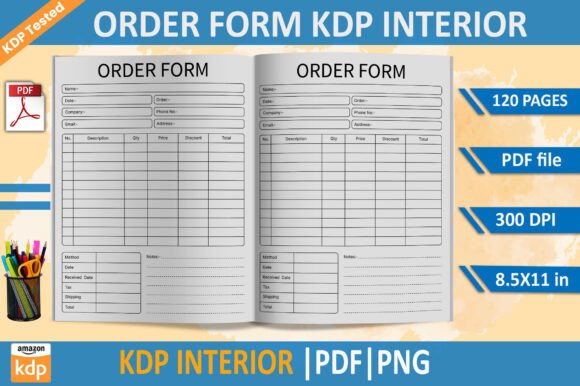
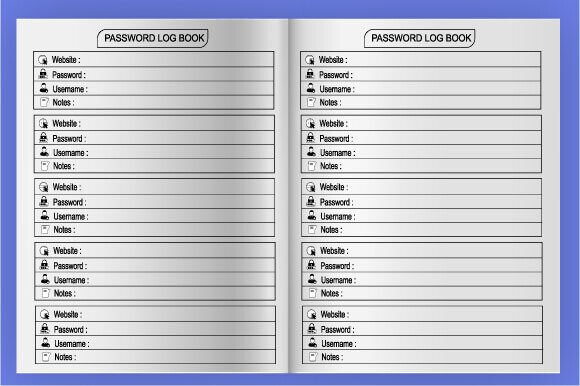
The Password Log Book KDP Template is an 8.5×11 inch interior file package designed explicitly for Amazon Kindle Direct Publishing. It includes 100 pages of clean, consistent logbook-style layouts—each optimized for handwritten or light annotation use. The interior is delivered in three production-ready formats: EPS (for scalable vector edits), PDF (for direct KDP upload), and PNG (for preview or hybrid workflows). All files are CMYK color-mode and rendered at 300 PPI—meeting KDP’s print quality thresholds without requiring post-processing adjustments.
This isn’t a repurposed journal design or a resized planner page. It follows the structural logic of a dedicated password log: clear entry fields, date columns, service name lines, username/email prompts, and secure space for passwords—all arranged with visual hierarchy and ample line spacing. There’s no decorative clutter, no inconsistent margins, and no untested bleed or gutter behavior. That consistency matters when users flip through physical copies or scan pages for quick reference.
KDP-Tested Integrity Matters More Than You Think
“KDP-tested” isn’t just marketing language here—it reflects real-world validation. The template has been uploaded, previewed, and printed via KDP’s system using standard white paper and matte cover options. That means margins align correctly on both left and right pages, text remains fully legible near the binding edge, and no content vanishes into the gutter. Many free or low-cost templates fail at this stage, forcing creators to troubleshoot alignment issues mid-upload or discover formatting errors only after ordering a proof.
Because it uses CMYK color mode from the start—not RGB converted later—the grayscale rendering stays neutral and readable. No unexpected contrast shifts or washed-out lines appear in final prints. For users relying on handwriting, that predictability supports long-term usability: ink doesn’t bleed unpredictably, lines don’t blur, and page numbers remain crisp even after repeated handling.
Who Benefits—and How They Use It
Professionals managing multiple client accounts—freelance web developers, SEO consultants, or social media managers—often keep track of login credentials across platforms, hosting dashboards, analytics tools, and CMS backends. A printed logbook offers a low-tech, offline alternative to password managers when devices aren’t available or security policies restrict cloud-based storage. In those cases, the Password Log Book KDP Template becomes part of a documented, auditable workflow—not just a convenience.
Small business owners maintaining shared access to accounting software, domain registrars, or e-commerce platforms may distribute physical copies to trusted team members while keeping digital records separate. Educators teaching cybersecurity fundamentals sometimes use printed logs as classroom exercises—demonstrating password hygiene, rotation schedules, or credential categorization without exposing live systems.
It’s also used by creators launching companion workbooks. For example, a blogger offering a “Digital Security Starter Kit” might bundle this logbook interior with checklists, threat assessment worksheets, and encryption guides—all formatted to the same trim size and aesthetic. Consistency across product lines reinforces professionalism and reduces customer support questions about layout mismatches.
Practical Strengths and Realistic Considerations
The interior’s strength lies in its restraint. It avoids over-engineering—no QR code placeholders, no embedded encryption instructions, no dated icons or fonts that limit resale potential. That neutrality gives creators flexibility: you can brand it with your own cover, add a short introduction page, or integrate it into a larger workbook series without visual dissonance.
High-resolution output ensures clarity even when users write in fine-point pen or use light-colored inks. The 100-page count strikes a balance: enough space for meaningful organization (e.g., grouping by category—“Hosting,” “Email,” “Payment Gateways”) without overwhelming new users. It’s neither under-resourced like a 24-page mini-log nor unwieldy like a 200-page binder-style version that risks poor binding durability.
That said, it’s not a replacement for encrypted digital solutions in high-risk environments. It assumes responsible physical storage—locked drawers, restricted access, controlled printing—and complements rather than substitutes for multi-factor authentication or zero-trust practices. Users expecting auto-generated passwords, breach alerts, or sync capabilities will need additional tools. This template solves one narrow problem well: providing a clean, compliant, printable structure for manual credential logging.
Workflow Integration and Long-Term Value
For creators building a catalog on KDP, having a reliable, spec-compliant interior like the Password Log Book KDP Template reduces friction across projects. Once you understand how the file behaves in KDP’s previewer, you can reuse the same workflow for future logbook variants—doctor visit trackers, medication logs, or equipment maintenance records—without revalidating core settings each time.
EPS format support allows experienced designers to modify line weights, adjust column widths, or insert custom headers—while preserving scalability. Less technical users can skip editing entirely and upload the PDF directly. Either way, the foundation remains stable. That dual-path usability separates it from rigid JPEG-based templates that break when zoomed or resized.
Long-term value emerges in consistency and time saved. Instead of troubleshooting margin offsets or resubmitting rejected files, creators move straight to branding, description writing, and keyword optimization. For someone publishing multiple niche logbooks per quarter, those small efficiencies compound quickly—freeing up hours better spent on audience research or content refinement.
A Straightforward Fit for Specific Needs
If your goal is to publish a functional, no-frills password logbook that meets KDP’s technical bar without demanding design expertise or extensive testing—you’ll find the Password Log Book KDP Template fits cleanly into that workflow. It won’t dazzle with animations or interactive features, nor does it try to. Its purpose is narrow, its execution precise, and its compliance verified.
It suits creators who value repeatability over reinvention—who’d rather invest energy into thoughtful descriptions, accurate categories, and responsive customer communication than debugging page alignment. And it serves end users who appreciate clarity, durability, and quiet utility over ornamentation.
As with any KDP interior, success depends less on the template alone and more on how it’s positioned: clear title phrasing (“Password Log Book: Secure Handwritten Tracker for Professionals”), honest backend keywords, and realistic cover design that signals function before flair. Used deliberately, this template becomes part of a dependable publishing rhythm—not a one-off experiment.