Ultimate Wedding Planner KDP Interior
Imagine launching a low-content book that stands out—not because it’s flashy, but because it’s thoughtfully built for real use. The Ultimate Wedding Planner KDP Interior is exactly that: a professionally crafted, print-ready interior template designed for creators who value precision, flexibility, and speed. It’s not just another PDF—it’s a foundation you can adapt, brand, and scale without redesigning from scratch.
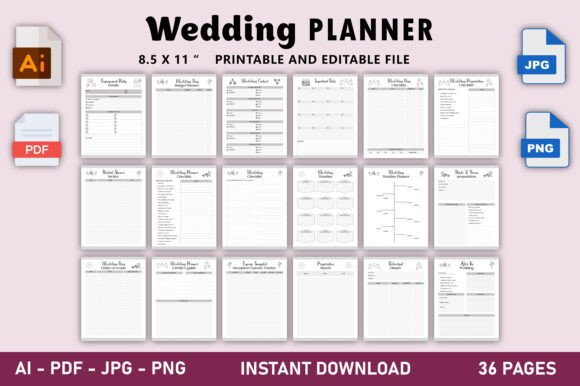
This 36-page planner interior arrives with everything needed to publish confidently on Amazon KDP: bleed included, 300 DPI resolution, and full compatibility tested across KDP’s latest specs. Whether you're launching your first wedding planner or expanding a catalog of niche organizers, this file saves hours—no wrestling with margins, no guessing at bleed zones, no last-minute reformatting before upload.
What Makes This Interior Different
Most KDP templates cut corners to keep prices low—thin fonts, inconsistent spacing, or untested layouts that fail during KDP’s preflight check. The Ultimate Wedding Planner KDP Interior avoids those pitfalls. Every page is balanced for clarity and usability: clean section headers, intuitive date fields, guest list tables with room for notes, budget trackers with clear labeling, and timeline spreads that guide couples step-by-step—not overwhelm them.
The inclusion of an editable Adobe Illustrator (.ai) file changes how you work. You’re not locked into someone else’s design logic. Need to adjust font weights for better readability? Swap icons to match your brand palette? Add bilingual labels for a Spanish-speaking audience? All possible—without starting over. That level of control turns a static template into a living tool you shape around your audience’s needs.
Creative Uses Beyond the Obvious
Yes, it’s built as a wedding planner—but its structure invites reinterpretation. A freelance event coordinator could repurpose the vendor contact pages and contract checklist into a Corporate Event Manager Kit, targeting small businesses planning galas or product launches. A lifestyle blogger might layer in habit-tracking prompts and self-care reflections to create a Wedding Wellness Journal, appealing to couples prioritizing mental health during engagement.
Educators teaching hospitality or small business management can extract the budget worksheet and timeline grid as standalone classroom handouts—then pair them with discussion questions about vendor negotiation or milestone-based project management. Even non-wedding creators find value: the clean typography, consistent spacing, and logical hierarchy serve as a quiet masterclass in functional layout design.
How Different Creators Can Adapt It
- Beginners: Start simple—add your own cover, tweak the title page font, and upload the ready-to-go PDF. No design skills required. Use the JPG/PNG previews to mock up social media posts or Amazon thumbnails fast.
- Branded Sellers: Import the .ai file into Illustrator, replace placeholder colors with your brand hex codes, insert custom dividers or monogram motifs, and export fresh PDFs for multiple SKUs (e.g., “Modern Minimalist Wedding Planner” vs. “Rustic Elegance Edition”).
- Multi-Format Publishers: Repurpose the 8.5″ x 11″ interior into digital versions (PDF fillable forms), printable bundles (add bonus checklists as separate downloads), or even Notion-integrated planners by mirroring the section logic in a database.
- Non-English Markets: Translate headers and instructions directly in the .ai file—no need to rebuild grids. Test readability with native speakers, then export localized JPGs for Amazon marketplaces like KDP.de or KDP.jp.
Keeping Your Output Clear and Audience-Friendly
Clarity starts with restraint. When customizing, resist adding decorative elements that compete with function—like ornate borders around date fields or script fonts in budget tables. The original design succeeds because it prioritizes scannability: bold headers, generous white space, and consistent alignment. Preserve that discipline.
Test every change against real use. Print a sample page, grab a pen, and try filling it out as a bride would—does the guest list table have enough lines? Is the “Notes” column wide enough for meaningful comments? Does the timeline fit major milestones without crowding? If you’re designing for neurodiverse users, consider increasing line height slightly or using sans-serif fonts exclusively in editable layers.
Consistency matters most when scaling. If you plan to release seasonal editions (e.g., “Winter Wedding Planner”), reuse the same grid structure, icon set, and typographic rhythm—even if colors shift. That visual continuity builds recognition and trust across your catalog.
Practical Next Steps
You don’t need to launch five variations at once. Pick one idea that aligns with your current audience or platform goals. For example:
- Upload the unedited PDF under your own imprint—just add a custom cover—and test conversion rates on Amazon.
- Edit the .ai file to include your logo watermark on each page footer, then offer the planner as a premium download on your website (with optional upsell to printed version).
- Bundle the interior with three editable Canva templates (cover, social post, email header) and sell it as a “Launch-Ready Wedding Planner Bundle” to fellow creators.
Each path leverages the same core asset—no extra design time, no new licensing fees. Just focused execution.
If you’re building a sustainable low-content business, reliability matters more than novelty. The Ultimate Wedding Planner KDP Interior delivers that: a tested, adaptable, production-ready base—not a shortcut, but a smart starting point. It gives you room to think like a publisher, not just a reseller. And when your next idea calls for a different theme—bridal shower, vow renewal, elopement guide—you’ll already know how to move quickly, confidently, and clearly.