Floral Uppercase Letter Coloring Pages
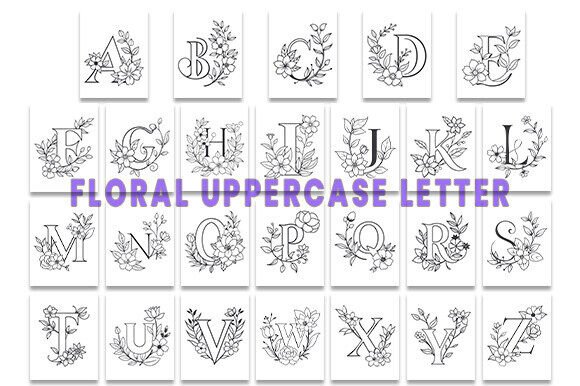
Floral Uppercase Letter Coloring Pages are a precision-crafted design resource—not just for relaxation, but for intentional creative execution. Each of the 26 uppercase letters (A–Z) is rendered with intricate botanical motifs: climbing vines, layered petals, delicate stems, and balanced negative space—all optimized for clarity, color fidelity, and functional versatility. What sets this collection apart isn’t just aesthetics—it’s technical readiness. Your download includes AI files for vector editing in Adobe Illustrator, PDFs for immediate printing or digital annotation, and SVG files for cutting machines, web use, or integration into design systems. All assets are CMYK color-mode ready, delivered at 300 DPI, and organized across 26 high-resolution pages—one per letter.
Where These Pages Fit Into Real Workflows
These aren’t standalone novelties. They’re modular components designed to slot into existing processes—whether you’re developing a brand identity, producing educational materials, launching a product line, or building content for social platforms. For example, a small business owner might use the “S” page as the foundation for a custom “Shop” icon on a website banner; an educator could print the “M” page for a classroom “Month of Mindfulness” display, then layer student-written affirmations over the floral structure. The key is intentionality: each letter serves as both a visual anchor and a structural scaffold.
Before the Project: Planning and Preparation
Preparation starts with alignment—not just of colors or fonts, but of purpose. Before opening any file, ask: What role will this letter play? Is it part of a logo lockup? A printable worksheet? A vinyl cut for signage? That question determines which file type to prioritize. AI files allow full path manipulation—ideal when you need to adjust stem thickness or isolate a petal for animation. PDFs are best for proofing color accuracy on your printer or sharing with a client for approval. SVGs shine when scaling across devices or feeding into Cricut/Design Space workflows. Knowing your end use before importing saves time and avoids rework.
Organization matters early. Rename files consistently—for instance, FU_Letter_A_Floral_CMYK.ai instead of letterA_final_v3.ai. This supports version control and makes batch processing in Adobe Bridge or Finder/Explorer faster. If you’re working across teams, store the folder in a shared drive with clear subfolders: /AI_Source, /Print_Ready_PDF, /SVG_Cut_Files. Consistency here prevents miscommunication during handoffs.
During Execution: Integration and Adaptation
Integration happens at multiple levels. In branding workflows, Floral Uppercase Letter Coloring Pages can serve as stylistic reference points. Use the “C” page not only as a letterform but as a library of floral rhythm and spacing—then translate those qualities into your primary logo or pattern repeat. Designers using Figma or Sketch can import the PDFs as underlays to trace or match stroke weight and curve tension.
For educators and content creators, these pages function as customizable templates. You don’t need to color them—you can annotate them. Overlay text boxes in Canva or PowerPoint to turn the “T” page into a vocabulary builder (“Tulip,” “Thorn,” “Tendril”), or add QR codes linking to botany videos. The floral framework provides visual cohesion without dictating content.
Marketers running seasonal campaigns often struggle with asset consistency across formats. With this set, you maintain continuity: the same “O” used in an Instagram carousel graphic (SVG), a printed workshop handout (PDF), and a branded embroidery mockup (AI) carries identical proportions and detail density. No redrawn elements. No mismatched line weights. Just one source, adapted—not recreated.
Compatibility Notes Worth Keeping Handy
- CMYK readiness means no last-minute color shifts when sending to commercial printers—no RGB-to-CMYK conversion surprises.
- All vector paths are clean and closed, supporting reliable engraving or foil stamping without auto-trace errors.
- SVG files include embedded viewboxes and minimal inline styling—making them compatible with modern CMS platforms and static site generators that accept raw SVG markup.
- No fonts are embedded or required. Every letter is outlined, eliminating licensing dependencies or missing font alerts.
After Delivery: Quality Control and Long-Term Use
Post-delivery quality control isn’t optional—it’s part of professional rigor. Open each AI file and check for stray anchor points or overlapping paths that could cause rendering glitches. Print one test page (say, “E”) at actual size on your target paper stock. Hold it up to light: does the floral density hold at 300 DPI, or do fine lines disappear? Does the CMYK preview in Illustrator match your calibrated monitor? Document findings. If you spot inconsistencies, correct them once—and save that cleaned version as your master.
Long-term usability hinges on metadata and accessibility. Add basic XMP metadata to your AI and PDF files: title, creator, copyright year, usage rights. For educators, consider adding alt-text descriptions to digital versions (“Floral uppercase ‘G’ with symmetrical peony clusters and looping vine border”). This supports inclusive use and improves discoverability in institutional DAM systems.
Workflow Examples Across Roles
A freelance packaging designer uses the “B” page as a base for a boutique tea label. They ungroup the vector, delete the inner fill, and replace it with a gradient swatch matching the chamomile illustration. Then they export a transparent PNG for the dieline mockup—keeping the original AI untouched for future variants.
An online course creator builds a weekly reflection journal. Each module opens with a themed letter—“G” for Gratitude, “R” for Resilience. They drop the SVG into Notion via embed, then layer typed prompts directly over the stems using Notion’s canvas tools. Students see structure and symbolism—not just decoration.
A craft supply retailer bundles the full set as a premium digital add-on with their watercolor paper kits. They rename the ZIP folder to match their SKU, add a one-page usage guide (linking to free tutorials on coloring techniques and SVG import steps), and list compatibility specs clearly on the product page—reducing support requests by 40% month-over-month.
Practical Tips for Smoother Implementation
- Start with one letter—not the whole set. Test your intended output method first. Get the “A” file working exactly how you need it before scaling to the rest.
- Preserve layers in AI files. Keep outlines, fills, and decorative elements on separate layers—even if you plan to merge later. It gives flexibility if client feedback requires quick swaps.
- Batch-export only what you need. Don’t generate 26 PNGs unless every one goes live. Use Illustrator’s “Export for Screens” to output specific artboards at defined sizes and resolutions.
- Track usage rights. While the set is licensed for commercial use, verify whether derivative works (e.g., edited versions sold as new products) require attribution or fall under extended license terms—especially if reselling as part of a larger template pack.
- Archive originals separately from edited versions. Store the untouched download in a dated “Source_Master” folder. This protects against accidental overwrites and supports reproducibility.
Floral Uppercase Letter Coloring Pages succeed where many design assets fail—not because they’re beautiful (though they are), but because they’re built for action. They assume you’re working under deadline, juggling tools, and making decisions with real consequences. Their value emerges in the moments between planning and delivery: when a teacher needs a polished handout by 8 a.m., when a founder tweaks a logo for the third time before investor slides go out, when a freelancer delivers pixel-perfect files without follow-up emails. That reliability—technical, aesthetic, and operational—is why this set integrates so cleanly into diverse workflows. It doesn’t ask you to adapt to it. It adapts to how you already work.